The Herakles guide
Everything from the first download to restoring a whole disk. This guide is for Herakles v0.2.3. Every command also has --help with examples.
Overview
Herakles copies your files, folders, disks or partitions into a repository: a folder on a disk, a network share, an SFTP server or a Herakles repository server. Inside the repository everything is split into chunks, deduplicated, compressed and encrypted. Each backup run creates a snapshot, a complete picture of the backed-up data at that moment, from which you can restore any file.
All of Herakles is one program file. Depending on how you start it, it is:
| Command | What it is |
|---|---|
herakles <command> | The command line interface (CLI): backup, restore, snapshots and so on. |
herakles gui | The desktop interface. It runs locally and opens in an app window or your browser. |
herakles tray | Scheduled backups plus the desktop interface plus a tray icon. The easiest way to use Herakles on a desktop. |
herakles tui | A full-screen terminal interface, for servers and SSH sessions. |
herakles daemon | The background service that runs scheduled backups, installable as a systemd or Windows service. |
herakles server | The optional repository server that stores backups of other computers. |
All of them read and write the same YAML configuration file.
Installation
Download the file for your system from the download section. There is no installer and nothing else to install.
Linux
curl -LO https://herakles.kloeck-it.de/downloads/herakles-linux-amd64   # or -arm64 / -armv7
curl -LO https://herakles.kloeck-it.de/downloads/SHA256SUMS
sha256sum -c --ignore-missing SHA256SUMS
sudo install -m 755 herakles-linux-amd64 /usr/local/bin/herakles
herakles version
Not sure which file? Run uname -m: x86_64 means amd64, aarch64 means arm64, armv7l means armv7.
Windows
Download herakles-windows-amd64.exe (or -arm64), rename it to herakles.exe and move it to a permanent folder such as C:\Program Files\Herakles. If you plan to install the Windows service, the file must stay where it is. To call it from any terminal, add the folder to your PATH.
(Get-FileHash .\herakles.exe).Hash      # compare with SHA256SUMS
.\herakles.exe version
SmartScreen may warn about an unknown publisher because the file is not code-signed: choose More info → Run anyway.
macOS (experimental)
The Apple Silicon build has not been tested on a Mac yet. CLI, terminal UI and GUI are expected to work; the tray icon is not available. Remove the download quarantine with xattr -d com.apple.quarantine herakles-macos-arm64.
Updating and removing
To update, replace the file and restart whatever runs it (the tray, or herakles daemon restart for the service). Repositories and configuration stay compatible. To remove Herakles, run herakles tray autostart off and herakles daemon uninstall if you used them, then delete the file. Your configuration lives in the file shown by herakles config path; your backups stay in their repositories.
Quick start
With the desktop interface
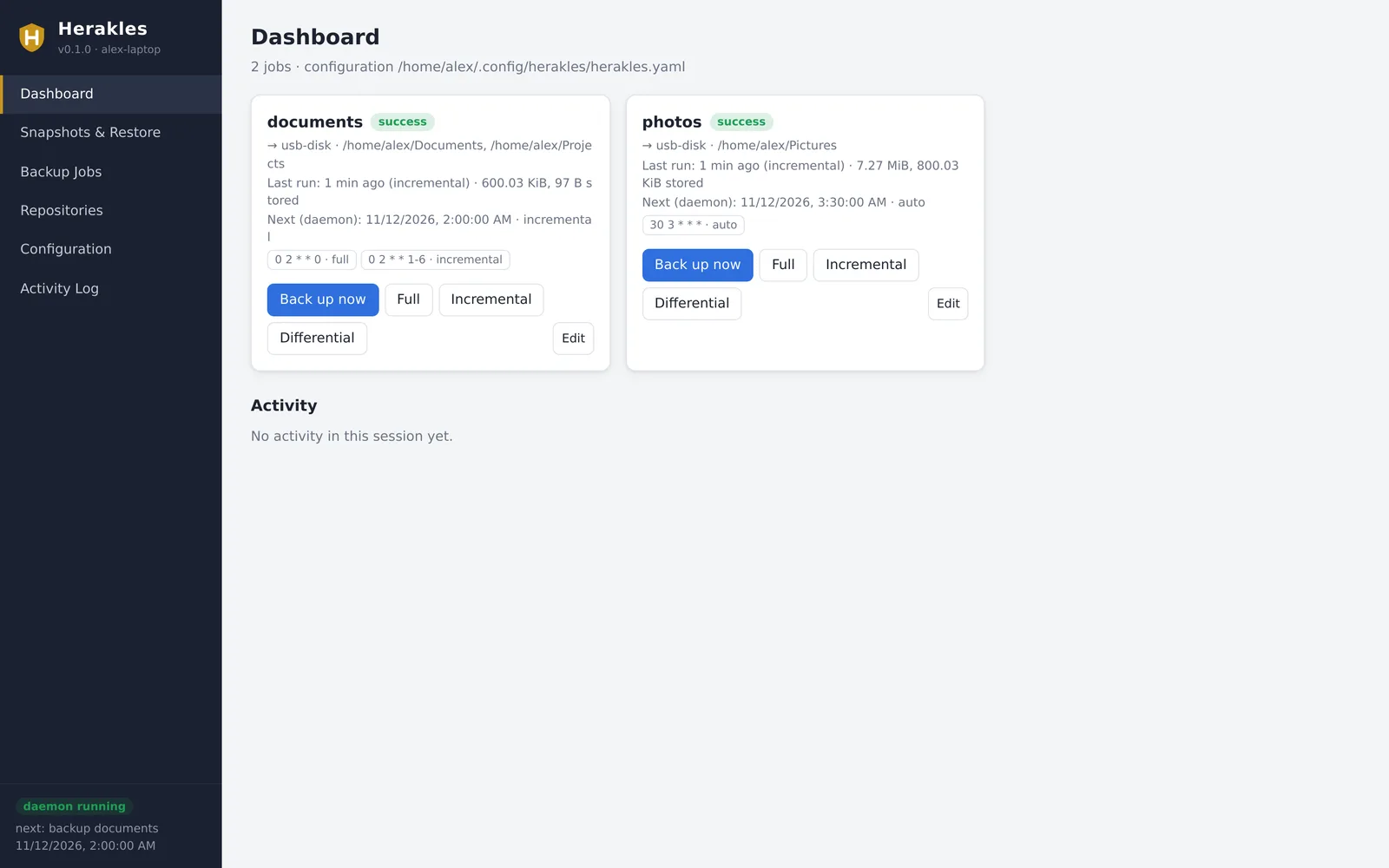
- Start Herakles in the tray and open its window:
herakles tray --open
On a computer without a system tray, useherakles guiinstead. - Open Repositories → Add repository. Give it a name (for example
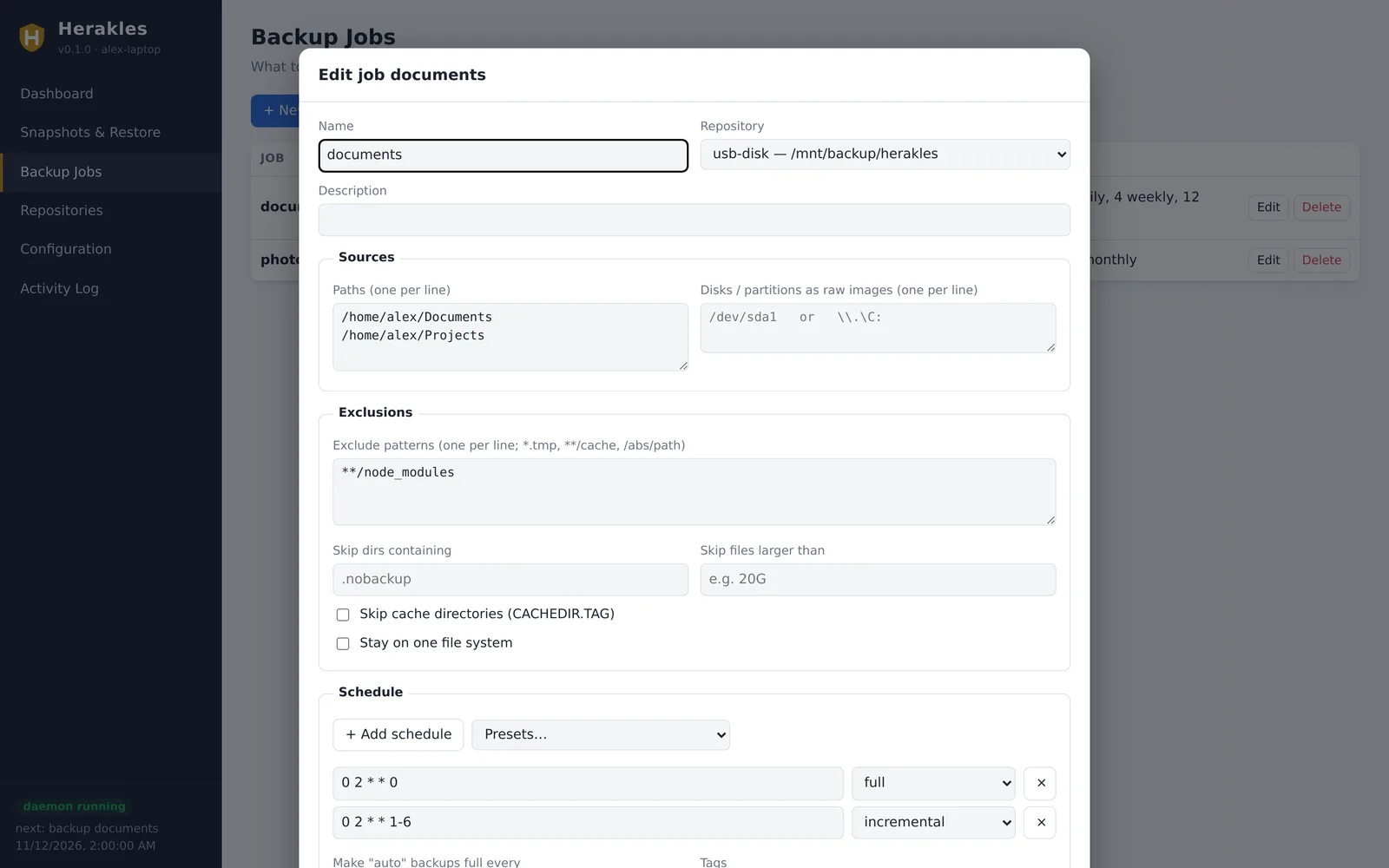
usb-disk), a location such as/media/alex/Backup/herakles,D:\Backups\heraklesor\\nas\backup\herakles, and choose how it is unlocked. A password file lets backups run unattended; with ask, Herakles asks for the password in the interface. Save, then click Initialize. - Open Backup Jobs → New job. Pick the repository, enter the folders to back up, add exclusions if you like and choose a schedule from Presets (for example “Daily, full on Sunday”). Set the retention, for example 7 daily, 4 weekly, 12 monthly.
- On the Dashboard, click Back up now. The first backup reads everything; later ones only read what changed.
- Under Configuration, tick Start Herakles in the system tray when I log in. From now on, backups run on schedule whenever you are logged in.
With the command line
# 1. Store the repository password in a file only you can read
mkdir -p ~/.config/herakles
read -rs PW && printf '%s\n' "$PW" > ~/.config/herakles/password && chmod 600 ~/.config/herakles/password

# 2. Define a repository and a job
herakles config set repo usb-disk /media/alex/Backup/herakles \
    --password-file-path ~/.config/herakles/password
herakles config set job home --repository usb-disk --path ~ \
    --exclude '**/.cache' --exclude '**/node_modules' \
    --schedule '0 2 * * 0=full' --schedule '0 2 * * 1-6=incremental' \
    --yaml 'retention: {keep_daily: 7, keep_weekly: 4, keep_monthly: 12}'

# 3. Create the repository and run the first backup
herakles init --repo usb-disk
herakles backup home

# 4. Look at the result
herakles snapshots
herakles ls latest ~/Documents

# 5. Run the schedules in the background (pick one)
herakles tray autostart on                       # desktop: tray icon at login
sudo herakles daemon install && sudo herakles daemon start   # server: system service
Instead of config set you can write the file yourself: herakles config init writes a fully commented example, and herakles config edit opens it in your editor and validates it when you save.
Keep your password safe, and somewhere else too. Without the password (or key file), nobody, including you, can read the backups. Store a copy in a password manager or on paper.
Without a configuration
For a one-off backup you don't need a configuration file at all:
herakles init   --repo /mnt/usb/backup
herakles backup --repo /mnt/usb/backup --path ~/Projects --path ~/Documents
herakles snapshots --repo /mnt/usb/backup
Concepts
- Repository
- Where backups are stored. One repository can hold backups of many jobs and many computers; identical data is stored only once across all of them.
- Job
- What to back up (folders and/or disks), into which repository, when, and how long to keep it.
- Snapshot
- The result of one backup run: a complete, read-only view of the job's data at that time, identified by a short ID such as
2939cbe7.latestmeans the newest one. - Backup type
- How much work a run does to find changes:
full,incremental,differentialorauto. See backup types. - Retention
- Rules that decide which old snapshots are kept. Removing a snapshot is called forget; freeing the space it used is called prune.
- Daemon
- The background process that runs jobs on their schedules: the tray or the system service.
Because data is deduplicated, a snapshot only adds the chunks that are new. A daily backup of 500 GB where 2 GB changed adds about 2 GB, and every snapshot is still complete. Deleting any snapshot never breaks another one, unlike tape-style incremental chains.
Repositories
A repository is created once with herakles init (or Initialize in the GUI). It is defined in the configuration like this:
repositories:
  - name: usb-disk
    location: /media/alex/Backup/herakles
    password_file: ~/.config/herakles/password
Storage locations
| Where | Location | Notes |
|---|---|---|
| Local disk, USB disk | /mnt/backup/heraklesD:\Backups\herakles | The folder is created by init. |
| Mounted NFS or CIFS share | /mnt/nas/herakles | Mount the share as usual; Herakles sees a normal folder. |
| Windows share (UNC) | \\nas\backup\herakles | Uses the Windows login. For the Windows service, the service account needs access. |
| SMB/CIFS without mounting | smb://WORKGROUP;backup@nas.local/backups/herakles | smb://[DOMAIN;]user@host/share/path. Set the share password in remote.password_env or remote.password. |
| SFTP | sftp://backup@host.example.com/srv/herakles | Uses ssh-agent, ~/.ssh keys and known_hosts, or remote.identity_file / remote.known_hosts. |
| Herakles server | herakles://backup.example.com:8443/alex-laptop | HTTPS; herakles+http:// for plain HTTP on a trusted network. See repository server. |
Examples with the remote settings:
repositories:
  - name: nas
    location: smb://WORKGROUP;backup@nas.local/backups/herakles
    password_file: ~/.config/herakles/password      # repository password
    remote:
      password_env: NAS_PASSWORD                    # SMB account password

  - name: offsite
    location: sftp://backup@vps.example.com/srv/herakles
    password_file: ~/.config/herakles/password
    remote:
      identity_file: ~/.ssh/id_ed25519
Passwords and key files
A repository is unlocked with a password, a key file, or both (then you need both). Herakles looks for the password in this order:
password: written directly in the configuration (discouraged);password_file: the first line of a file (protect it withchmod 600);password_env: an environment variable;password_command: the output of a command, for examplepass show backup/heraklesor a secret manager;- the
HERAKLES_PASSWORDenvironment variable; - otherwise the CLI, TUI and GUI ask you. The system service cannot ask, so it needs one of the sources above. The tray can ask: the repository shows as locked until you enter the password in the window.
Key files are random 256-bit keys:
herakles key generate ~/.config/herakles/repo.key
herakles init --repo usb-disk --key-file ~/.config/herakles/repo.key        # password + key file
herakles init --repo /mnt/usb --generate-key-file ~/.herakles.key          # create and use one
In the configuration, set key_file: on the repository. A repository can have several keys, for example your own password plus an emergency key file kept in a safe:
herakles key list   --repo usb-disk
herakles key add    --repo usb-disk --label "emergency" --new-key-file /media/safe/emergency.key --no-password
herakles key passwd --repo usb-disk                 # change the password of the key you use
herakles key remove --repo usb-disk <KEY-ID>
If all passwords and key files of a repository are lost, the data cannot be recovered. There is no back door.
Repository options
| Option | Meaning |
|---|---|
compression | auto (default: zstd, skipping incompressible data), none, zstd, zstd:1…zstd:4 (faster…smaller), or auto,zstd:3. |
pack_size_mib | Size of the pack files data is stored in (default 16). Larger packs mean fewer files on the storage. |
connections | Parallel connections to remote storage. |
upload_limit_kib, download_limit_kib | Bandwidth limits in KiB/s, for example 5120 for 5 MiB/s. |
maintenance.prune_schedule | Cron schedule for freeing unused space (see maintenance). |
maintenance.check_schedule, check_read_data | Cron schedule for integrity checks, optionally downloading a share of the data such as 10%. |
chunker | min_kib, avg_kib, max_kib: chunk sizes, fixed when the repository is created. The defaults suit almost everyone. |
Backup jobs
jobs:
  - name: home
    description: Home directory
    repository: usb-disk
    paths: [/home/alex]
    exclude: ["**/.cache", "**/node_modules", "*.tmp", /home/alex/Downloads]
    exclude_caches: true
    full_interval: 7d
    schedule:
      - { cron: "0 2 * * 0",   type: full }
      - { cron: "0 2 * * 1-6", type: incremental }
    retention: { keep_daily: 7, keep_weekly: 4, keep_monthly: 12 }
Sources
paths: files and folders. Herakles stores permissions, owner, timestamps, symlinks, FIFOs, device nodes and, on Linux, extended attributes.devices: whole disks or partitions as raw images, for example/dev/sda1,/dev/nvme0n1,\\.\C:or\\.\PhysicalDrive0. See disks and partitions.tags: labels added to every snapshot of the job, useful for filtering and forkeep_tags.
Backing up system folders or other users' files needs root (Linux) or administrator rights (Windows); use the system service for that.
Exclusions
| Option | Example | Effect |
|---|---|---|
exclude | *.tmp | Any file or folder named like this, anywhere. |
**/node_modules | Folders of this name at any depth. | |
/home/*/Downloads | An absolute path (with wildcards). | |
exclude_if_present | [.nobackup] | Skip folders that contain a file with this name. |
exclude_caches | true | Skip folders marked with a CACHEDIR.TAG file (browsers and build tools set these). |
exclude_larger_than | 20G | Skip files bigger than this. |
one_file_system | true | Don't descend into other mounted file systems. |
Backup types
The type decides how Herakles finds what changed. Thanks to deduplication, all types store unchanged data only once, and every snapshot is complete and can be restored on its own.
| Type | What it reads | Use it for |
|---|---|---|
full | Every byte of every file, without relying on earlier snapshots. Also catches changes that didn't update the file's modification time. | A weekly or monthly run that verifies everything. |
incremental | Only files whose size, modification time, change time or inode differ from the latest snapshot of the job. | Fast daily or hourly runs. |
differential | Like incremental, but compared with the latest full snapshot. | When you prefer comparing with a fixed baseline. |
auto (default) | Incremental, but full when the last full backup is older than the job's full_interval (for example 7d). The very first backup is always full. | A single schedule that takes care of itself. |
Run a specific type by hand with herakles backup home --type full, or with the Full / Incremental / Differential buttons in the GUI.
Schedules
Each job can have several schedules, each with its own backup type. Schedules use the standard five cron fields, in the computer's local time:
┌───────── minute (0–59)
│ ┌─────── hour (0–23)
│ │ ┌───── day of month (1–31)
│ │ │ ┌─── month (1–12)
│ │ │ │ ┌─ day of week (0–6, Sunday = 0)
│ │ │ │ │
0 2 * * 0      Sunday 02:00
0 2 * * 1-6    Monday–Saturday 02:00
0 */4 * * *    every 4 hours
30 12 1 * *    12:30 on the 1st of every month
Shortcuts work too: @daily, @weekly, @monthly, @hourly and @every 6h.
schedule:
  - { cron: "0 2 * * 0",   type: full }          # weekly full
  - { cron: "0 2 * * 1-6", type: incremental }   # daily incremental
  - { cron: "0 */4 * * *", type: auto }          # every 4 hours, full when due
catch_up: true      # run a missed schedule when the daemon starts (laptop was off)
retry:
  attempts: 2       # retry failed runs
  delay: 10m
On the command line: --schedule '0 2 * * 0=full'. In the GUI, the job editor has presets. Schedules only run while the tray or the service is running; herakles jobs shows each job's schedules and last result.
Two daemon settings affect all jobs: daemon.max_concurrent_jobs (default 1, so jobs queue up) and daemon.log_file.
Retention
After every backup, the job's retention rules decide which of its snapshots to keep. A snapshot is kept if any rule keeps it. Without rules, everything is kept.
| Rule | Keeps |
|---|---|
keep_last: N | the N newest snapshots |
keep_hourly, keep_daily, keep_weekly, keep_monthly, keep_yearly: N | the newest snapshot of each of the last N hours, days, weeks, months, years that have one |
keep_full: N | the N newest full backups |
keep_within: 14d | everything from the last 14 days |
keep_within_daily: 1m (and _hourly, _weekly, _monthly, _yearly) | one per day for the last month, and so on |
keep_tags: [important] | every snapshot with one of these tags |
group_by: job,host | how snapshots are grouped before the rules apply (default job,host; also paths, tags) |
Durations use y, m, w, d, h, for example 1y6m or 14d. They are measured from the newest snapshot, not from today, so if backups stop working for a while, retention never deletes your last good backups.
A classic plan: “weekly full, daily incremental, keep a week of dailies, a month of weeklies and a year of monthlies”:
schedule:
  - { cron: "0 2 * * 0",   type: full }
  - { cron: "0 2 * * 1-6", type: incremental }
retention:
  keep_daily: 7
  keep_weekly: 4
  keep_monthly: 12
  keep_full: 2
Forgetting a snapshot removes it from the list, but its data stays until a prune frees the space. Set prune: true on the job to prune right after each backup, or schedule it per repository with maintenance.prune_schedule (better for large repositories). To try rules before using them:
herakles forget --job home --dry-run
herakles forget --keep-daily 7 --keep-weekly 4 --keep-monthly 12 --dry-run
Running in the background
Schedules need a running daemon. There are two ways to run it. Use one or the other, not both, because they share the control port.
Tray (herakles tray) | System service (herakles daemon) | |
|---|---|---|
| Starts | when you log in | when the computer boots |
| Runs as | you | root / LocalSystem (or your user with --user) |
| Passwords | can ask in the window | needs a stored password source |
| Interface | tray icon and desktop window included | use herakles gui, tui or daemon status |
| Best for | laptops and desktops | servers and system-wide backups |
Tray icon
herakles tray                  # run now; --open also opens the window
herakles tray autostart on     # start at every login (off / no argument = show)
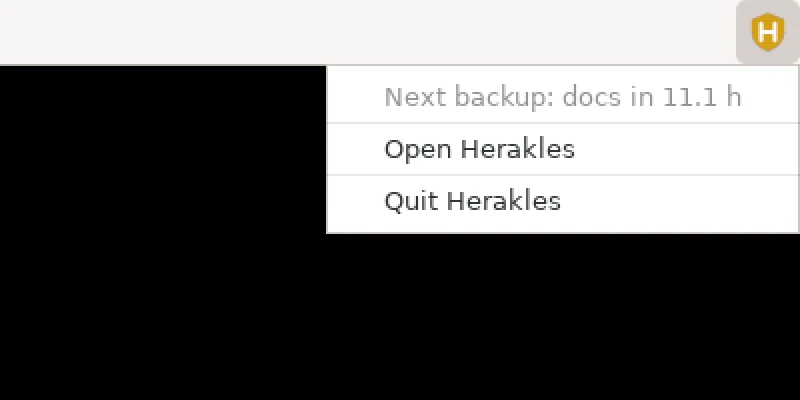
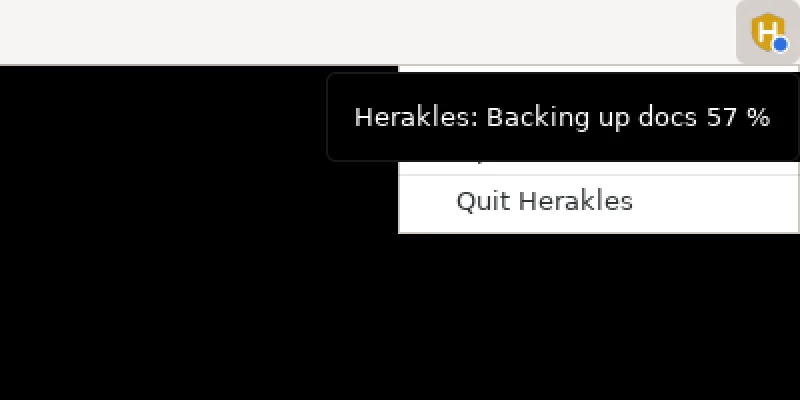
The icon's menu shows the status (next backup, progress, problems) and offers Open Herakles and Quit Herakles; a left click opens the window too. A dot on the icon shows the state: blue while a backup runs, amber when a repository needs its password, red when the last backup of a job failed.
Autostart is the tray.autostart option in the configuration; the checkbox under Configuration → Desktop in the GUI sets it as well. On Linux it adds an autostart entry and a Herakles Backup launcher to your applications menu; on Windows it uses the Run registry key of your account. Starting Herakles a second time just opens the window of the running one.
- Linux desktops: KDE Plasma, Xfce, Cinnamon, MATE, LXQt, Budgie, waybar and others show the icon directly. GNOME needs the AppIndicator and KStatusNotifierItem Support extension.
- Windows: the console window closes by itself when the tray starts at login or from Explorer.
- If there is no desktop at all,
herakles traykeeps running as daemon plus GUI and prints the address of the window.
System service
Linux (systemd)
sudo herakles daemon install       # system service, uses /etc/herakles/herakles.yaml
sudo herakles daemon start
herakles daemon status

herakles daemon install --user     # or a per-user service (systemd --user)
herakles daemon start --user
loginctl enable-linger $USER       # keep user services running without a login
As root, the configuration is /etc/herakles/herakles.yaml and state goes to /var/lib/herakles. The service is registered with the configuration file you used when installing it (--config works too). Logs: herakles daemon logs or journalctl -u herakles.
Windows service
Open a terminal as administrator, put the configuration in %ProgramData%\Herakles\herakles.yaml (Herakles prefers this file when it exists) and run:
herakles daemon install
herakles daemon start
herakles daemon status
The service runs as LocalSystem. Network shares must therefore be reachable without your personal login: use smb:// with credentials in the configuration rather than a mapped drive letter.
Controlling the daemon
herakles daemon status                       # schedule, running tasks, last results
herakles daemon trigger home --type full --wait
herakles daemon trigger usb-disk --kind prune     # or --kind check
herakles daemon cancel <TASK-ID>
herakles daemon reload                       # after editing the YAML (or send SIGHUP)
herakles daemon logs
herakles daemon stop | restart | service-status | uninstall
These commands talk to whichever daemon is running, tray or service, over a local control API (127.0.0.1:7477 by default, daemon.control_listen) protected by a random token. The GUI and TUI reload the daemon automatically after saving.
Finding and restoring
In the desktop interface
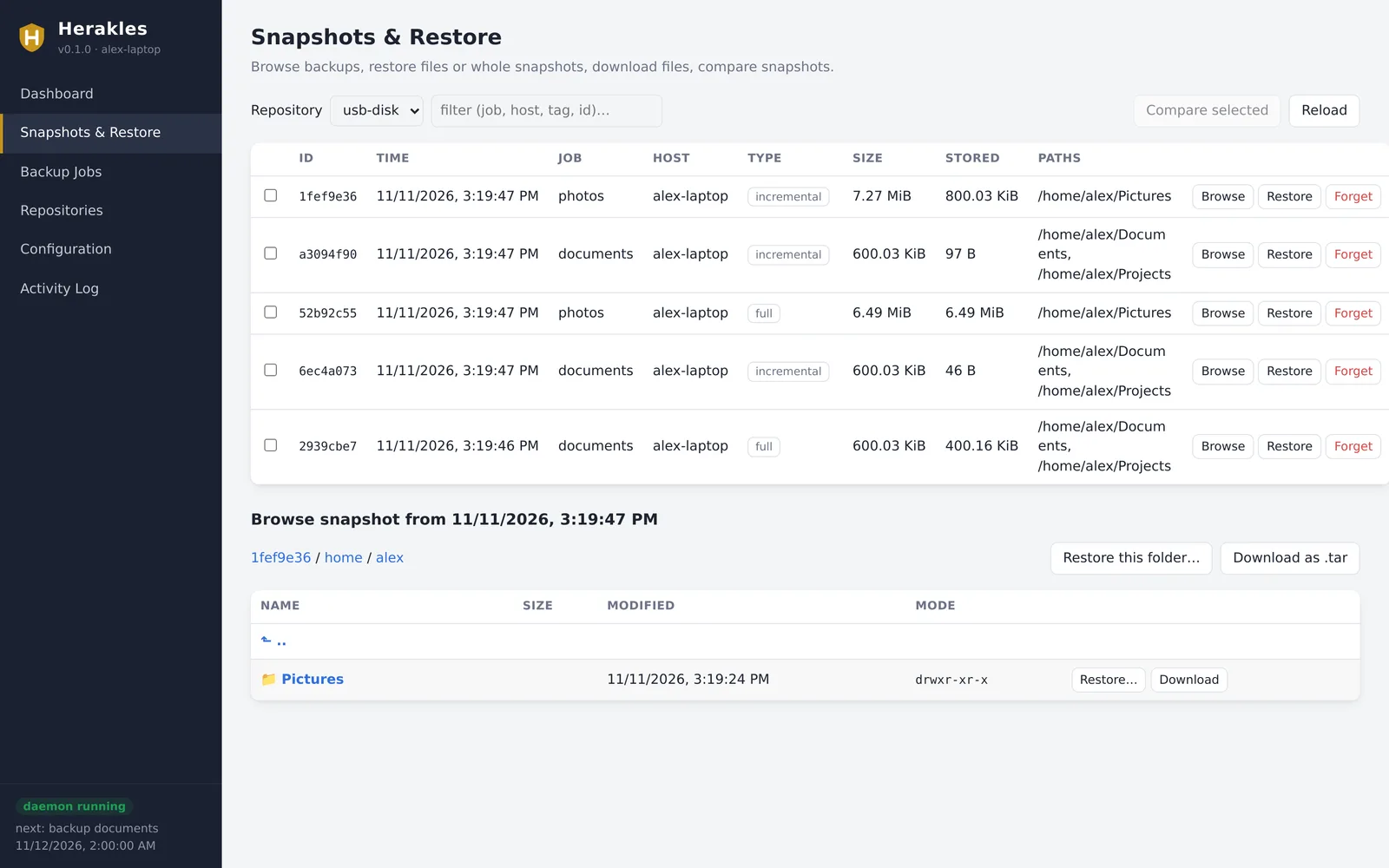
Under Snapshots & Restore, pick a repository, click Browse on a snapshot and walk through its folders. Restore… restores a file or folder (choose the target folder, what to do with existing files, an optional filter and verification); Download saves a file, or a folder as .tar. Tick two snapshots and click Compare selected to see what changed.
On the command line
herakles snapshots                               # all snapshots (--job, --host, --tag filter)
herakles ls latest /home/alex -l                 # list a folder of the newest snapshot
herakles ls 2939cbe7:/etc --recursive
herakles find '*.docx'                           # search all snapshots
herakles find '**/projects/*/README.md' --job home
herakles diff 2939cbe7 a3094f90                  # what changed between two snapshots

herakles restore latest --target /tmp/restore    # everything
herakles restore latest:/home/alex/Documents --target ~/recovered --verify
herakles restore latest --job home --include '*.pdf' --target /tmp/pdfs
herakles restore 2939cbe7 --target / --overwrite if-changed   # back to the original place

herakles dump latest /etc/fstab                  # print one file
herakles dump latest:/home/alex/projects --tar > projects.tar
latest combines with --job, --host and --tag, for example restore latest --job home. A snapshot path is written SNAPSHOT:PATH. On Windows, paths look like latest:C:\Users\alex\Documents.
| Option | Meaning |
|---|---|
--target DIR | Where to restore. A whole snapshot is restored with its full paths (/tmp/restore/home/alex/…); a path such as latest:/home/alex/Documents is restored as that folder directly inside the target (~/recovered/Documents). |
--overwrite | always (default), if-changed, never. |
--include, --exclude | Only restore / skip matching paths (repeatable). |
--verify | Read the restored files back and compare them with the snapshot. |
--dry-run | Show what would happen. |
--owner | Restore file owners (default on when running as root). |
Sparse files are restored sparse. To restore on another computer, install Herakles there, point it at the repository and give it the password; the snapshots of all computers are in the same repository (--host filters them).
Disks and partitions
Herakles can image whole devices block by block. Unused, zeroed areas deduplicate and compress to almost nothing, and later images only store changed blocks.
sudo herakles backup --repo offsite --device /dev/sda1              # ad hoc
# or in a job:  devices: [/dev/nvme0n1]

sudo herakles restore-device latest:/dev/sda1 --repo offsite --to /dev/sdb1 --force
herakles restore-device 2939cbe7:/dev/nvme0n1p2 --to /tmp/root.img     # into an image file
herakles restore latest:/dev/sda1 --target /tmp                        # → /tmp/sda1 (sparse image)
On Windows, use \\.\C: for a volume or \\.\PhysicalDrive0 for a disk, from an administrator terminal.
Consistency: an image of a mounted, changing file system can be inconsistent. Back up unmounted or read-only file systems, or create an LVM, ZFS or btrfs snapshot in a before hook and image that. --force is required to overwrite a block device, and the target must not be mounted.
Repository server
The repository server is optional. It stores repositories for other computers over HTTPS, so clients need neither a network share nor SSH access. The server only stores encrypted data: it never sees passwords, keys or file contents.
Setting it up
# on the server machine
sudo mkdir -p /etc/herakles /srv/herakles
sudo herakles server gen-cert /etc/herakles/server.crt /etc/herakles/server.key --hosts backup.example.com,192.168.1.10
herakles server hash-password            # prints a bcrypt hash for the user list
Create /etc/herakles/server.yaml:
server:
  listen: ":8443"
  data_dir: /srv/herakles
  tls_cert: /etc/herakles/server.crt
  tls_key: /etc/herakles/server.key
  quota_gib: 500                     # optional, per user
  users:
    - name: alex
      password_hash: "$2a$10$…"
      repositories: ["alex-*"]       # default: "alex" and "alex-*"
      append_only: true              # may add backups, never delete
    - name: admin
      password_hash: "$2a$10$…"
      repositories: ["*"]            # for forget/prune of append-only repositories
sudo herakles server run --config /etc/herakles/server.yaml
Run it permanently with a systemd unit, a container or your NAS's tools (see below). Options: --listen, --data-dir, --append-only (for everybody), and --no-auth for a trusted network only. Without tls_cert, the server speaks plain HTTP and prints a warning.
Append-only mode
An append-only account can create snapshots but cannot delete snapshots or data. If ransomware or an attacker takes over a client, they cannot destroy its backups on the server. Retention for such repositories is applied by a separate admin account, or on the server host itself pointing at the repository folder:
herakles forget --repo /srv/herakles/alex-laptop --keep-daily 14 --keep-monthly 12 --prune
Connecting clients
repositories:
  - name: offsite
    location: herakles://backup.example.com:8443/alex-laptop
    password_file: ~/.config/herakles/password        # repository password (encryption)
    remote:
      username: alex
      password_env: HERAKLES_SERVER_PASSWORD          # server login
      ca_cert: ~/.config/herakles/server.crt          # trust the self-signed certificate
Copy the server's server.crt to the client for ca_cert. With a certificate from a public CA (for example behind a reverse proxy), ca_cert is not needed. insecure_skip_verify: true disables the check entirely; avoid it outside tests. Then herakles init --repo offsite as usual.
On a NAS (QNAP, Synology)
Herakles is a single static program without dependencies, so it runs on most NAS systems. Pick the file matching the NAS CPU: linux-amd64 for Intel/AMD models, linux-arm64 or linux-armv7 for ARM models. The simplest way is a container (QNAP Container Station, Synology Container Manager) with a minimal image and the Herakles file mounted into it:
# docker-compose.yml, in a folder that also holds the herakles file and server.yaml
services:
  herakles:
    image: alpine:3.20
    command: ["/app/herakles", "server", "run", "--config", "/app/server.yaml"]
    volumes:
      - ./herakles:/app/herakles:ro
      - ./server.yaml:/app/server.yaml:ro
      - ./certs:/app/certs:ro
      - /share/Backups/herakles:/data          # QNAP; Synology: /volume1/backups/herakles
    ports:
      - "8443:8443"
    restart: unless-stopped
In server.yaml, set data_dir: /data and point tls_cert/tls_key at /app/certs/…. Make the file executable (chmod +x herakles) before starting. Without containers, you can also start herakles server run from the NAS's autostart mechanism over SSH.
Server or network share?
Both work. Storing the repository on a mounted share or via smb:// is the quickest setup. The server is worth it when:
- you want append-only protection: a client with share access can delete its backups, a client of an append-only server cannot;
- clients should not get share credentials at all, only a server account limited to their own repositories, with a quota;
- backups go over the internet or a slow link: one HTTPS port is easy to forward, and the protocol is made for repository access, while SMB is chatty over long distances;
- you want one place that hosts the repositories of many computers.
Docker Compose projects
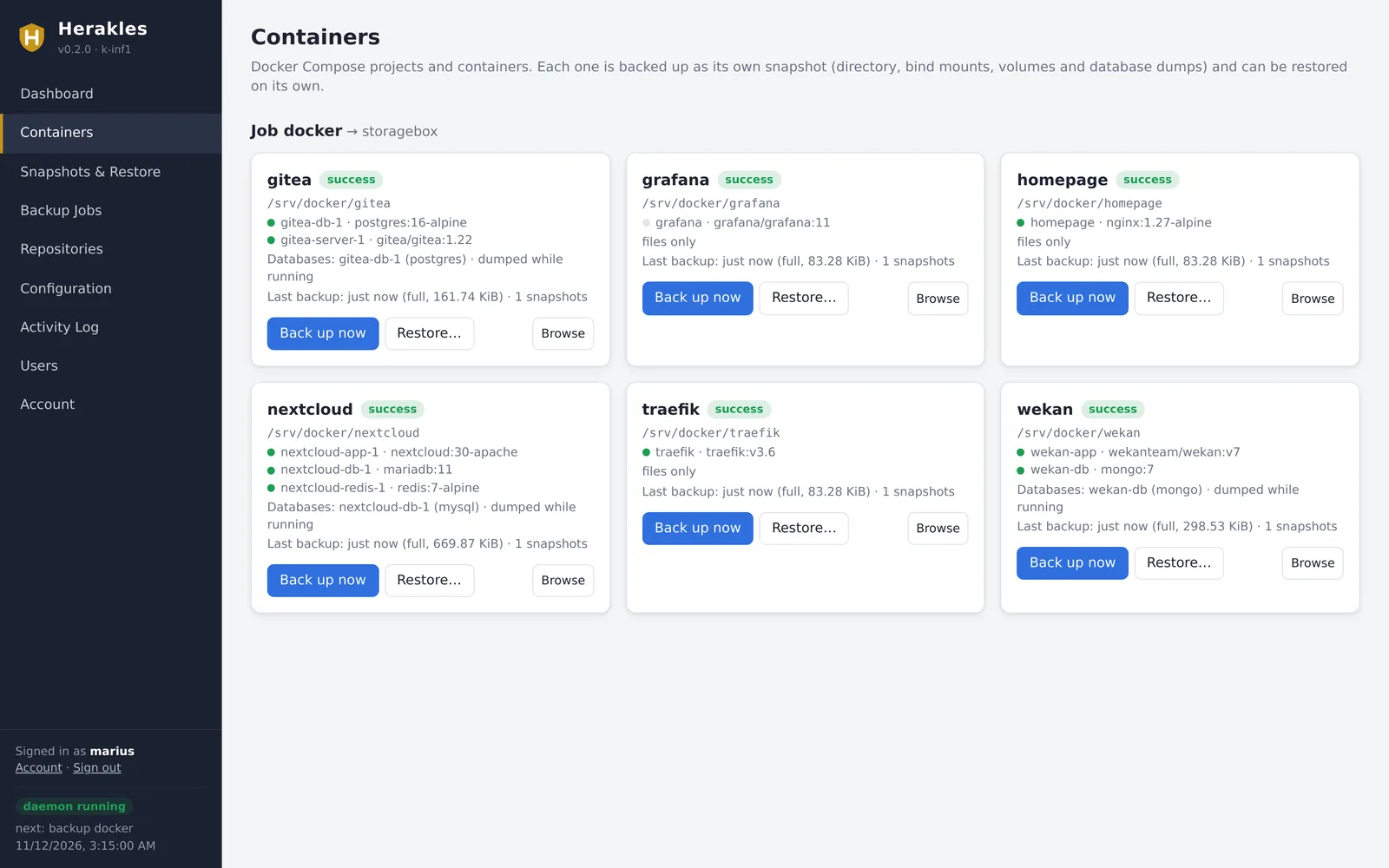
On a Docker host, Herakles can treat every Compose project as its own backup unit. Each project gets its own snapshot named JOB/PROJECT, so you can see, keep and restore wiki or nextcloud independently of everything else, and restore one project without touching the others.
Setting it up
Add a docker section to a job. Herakles finds the projects itself from the labels Docker Compose puts on its containers.
jobs:
  - name: containers
    repository: nas
    docker:
      folders: [/srv]                 # every project in /srv, also ones created later
      # projects: [wiki, shop-*]      # and/or these projects (names or globs)
      exclude_projects: [portainer]   # always left out
      # stop: [zammad]                # stop these during their backup instead of dumping
      # skip_dumps / skip_volumes / skip_bind_mounts / skip_standalone: true
    paths: [/srv/other-data]          # optional: host data outside the projects
    exclude: [/srv/traefik/logs]      # works for bind mounts too
    schedule: [{ cron: "15 3 * * *", type: auto }]
    full_interval: 7d
    retention: { keep_daily: 7, keep_weekly: 4, keep_monthly: 6 }
Choosing the projects
| Setting | Effect |
|---|---|
neither projects nor folders | Every project on the host, including ones created later. |
folders: [/srv] | Every project whose directory is inside /srv (for standalone containers: a bind mount inside it), including projects created later. The folders are also searched up to three levels deep for project directories whose containers don't exist right now. Everything else in the folders (files that belong to no project) goes into the job's own snapshot JOB, so nothing in them is missed and nothing is stored twice. |
projects: [wiki, shop-*] | These projects (names or glob patterns), in addition to the folders. |
exclude_projects: [portainer] | Always left out. |
stop: [zammad] | Stopped during their backup instead of dumping their databases. |
In the GUI, open Backup Jobs → New job (or Edit), tick Back up Docker containers and choose All projects on this host or Only the projects I choose. The editor lists every project on the host: tick the ones to back up, and per project whether it is stopped during its backup; folders you enter are applied right away (their projects show an “in /srv” tag). On the command line:
herakles config set job containers --repository nas --docker-folder /srv \
    --docker-project wiki --docker-exclude portainer --docker-stop zammad \
    --schedule '15 3 * * *=auto'
Retention applies to each project separately. Run the job as root (the system service), since project data usually belongs to root or container users.
herakles docker ls --last            # projects, containers, databases, data paths, last backup
herakles docker show wiki            # exactly what is backed up for one project
herakles docker backup wiki          # one project now (or: herakles backup containers/wiki)
herakles backup containers           # all projects
herakles snapshots --job containers/wiki
docker ls also lists volumes that belong to no project: those are not in any project backup. Add them to the job's paths if you need them.
What is backed up
| Part | Details |
|---|---|
| Project directory | The folder with the compose file, .env and everything inside it. |
| Bind mounts | Host folders and files mounted into the containers, also outside the project directory. System paths (/proc, /run, the Docker socket, /etc/localtime, …) are skipped. |
| Named volumes | Volumes mounted by the containers, plus volumes Compose created for the project (so stopped projects keep theirs). |
| Database dumps | For Postgres (pg_dumpall), MySQL/MariaDB (mysqldump/mariadb-dump with the root password from the container's environment) and MongoDB (mongodump), taken while the project runs. Credentials stay inside the container. Database containers without a running server (such as backup sidecars) are skipped. |
| Metadata | docker inspect output of all containers and which data belongs where, for restores and for re-creating standalone containers. |
Databases are covered twice: by their raw files and by a dump. Raw files of a running database are not guaranteed to be consistent; the dump always is. For complete consistency of everything, put a project in stop:: it is stopped for the few seconds its backup takes and started again afterwards.
Restoring a project
In the GUI, open Containers, click Restore… on the project, choose a snapshot and confirm by typing the project name. On the command line:
herakles docker restore wiki                       # latest snapshot, asks for confirmation
herakles docker restore wiki --snapshot 3fa2b1c9 --yes
herakles docker restore wiki --databases files     # raw database files instead of dumps
herakles docker restore wiki --keep-old            # keep the replaced data as PATH.herakles-old-TIME
herakles docker restore wiki --dry-run             # show what would happen
herakles docker restore wiki --target /tmp/wiki    # only extract the files; Docker is not touched
A restore runs these steps:
- Stop the project.
- Move its current data aside (project directory, bind mounts, volumes).
- Restore the data from the snapshot. If the containers don't exist (a fresh host), create them and their volumes with
docker compose up --no-startfirst. - Start the project.
- In dumps mode: the database directories start empty, so the database images initialise fresh databases; Herakles waits until they are ready and loads the dumps.
- Remove the moved-aside data (unless
--keep-old).
If anything fails before the project runs again, the previous data is put back and the project restarted. The default database mode is dumps for snapshots taken while running and files for snapshots taken with the project stopped. Restores are tested against real Postgres 16, MariaDB 11 and MongoDB 7 containers, including restoring onto a host where the containers, volumes and project directory had been deleted.
A restore takes an exclusive lock on the repository, so no scheduled backup reads half-restored data. Standalone containers (not created by Compose) are restarted if they still exist; if not, re-create them from inspect.json in the snapshot's metadata.
Web interface & accounts
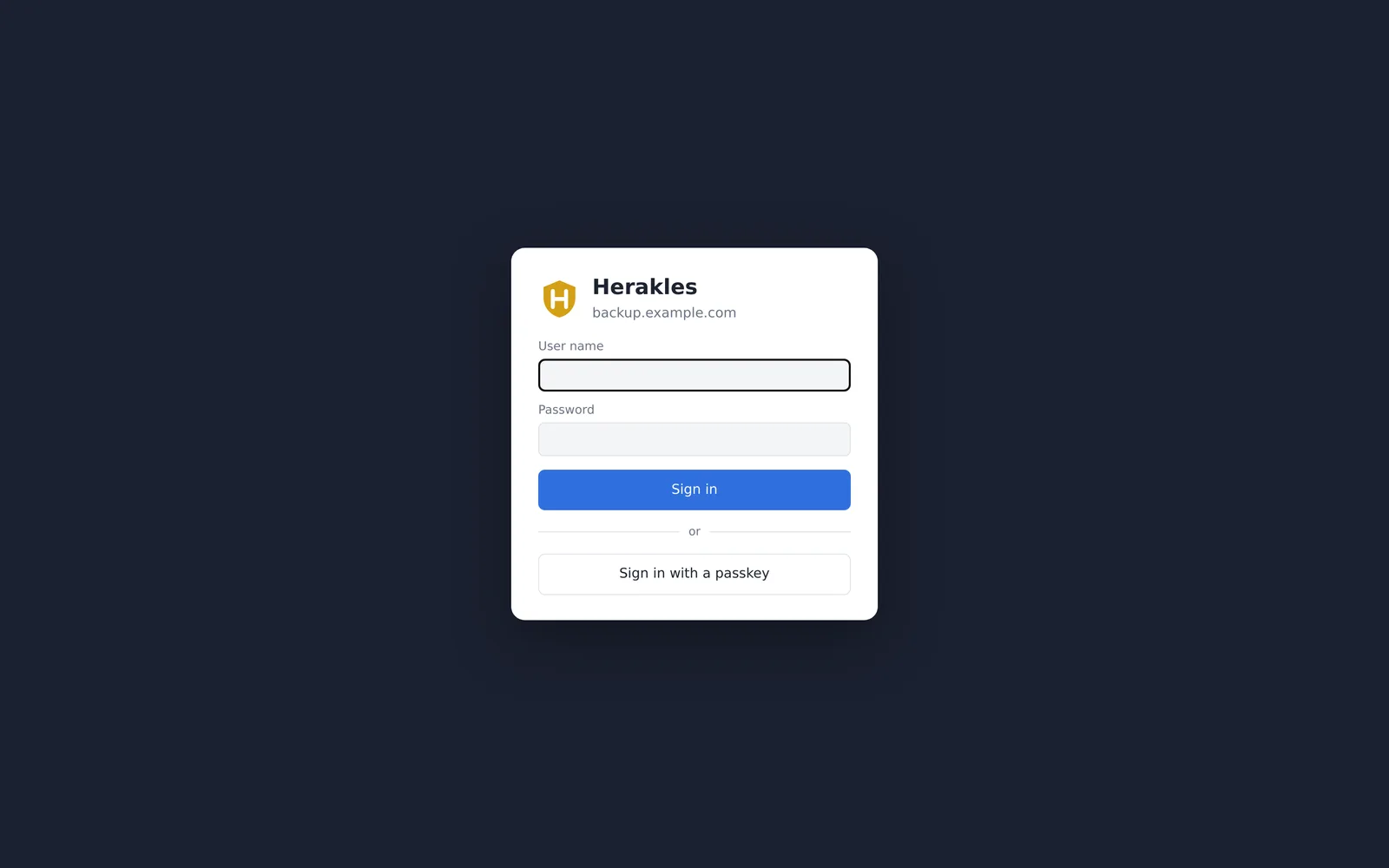
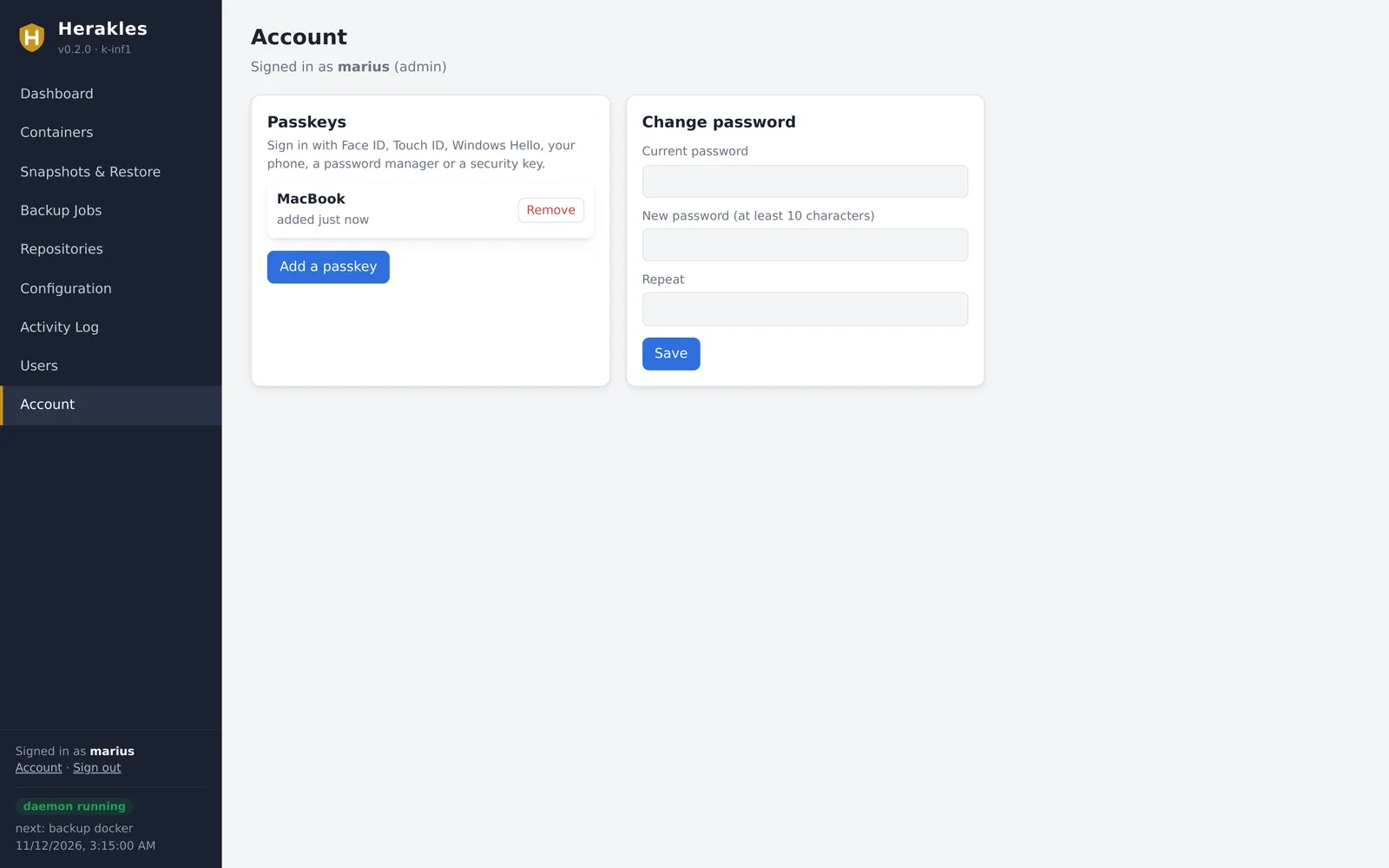
On a server, the daemon can serve the desktop interface on the network, protected by accounts. Users sign in with a password or a passkey (Face ID, Touch ID, Windows Hello, a phone, a password manager or a security key).
Setting it up
web:
  listen: 127.0.0.1:7480              # address the daemon listens on
  url: https://backup.example.com     # public address; passkeys are bound to this host name
  # tls_cert: /etc/herakles/web.crt   # serve HTTPS directly instead of behind a proxy
  # tls_key: /etc/herakles/web.key
  # session_hours: 12
Restart the service (herakles daemon restart). There is no public sign-up. While no account exists, the daemon writes a one-time setup link to its log; print it with:
sudo herakles web setup-link
# https://backup.example.com/login.html#setup=…
Open it to create the first administrator. Alternatively create one on the server: sudo herakles web add marius --admin.
Accounts and passkeys
| Role | Can |
|---|---|
| admin | Everything: configuration, repositories, jobs, users, deleting snapshots. |
| user | Dashboard, run backups, browse, download and restore (files and Docker projects). Sees the configuration without passwords; cannot change it. |
- Administrators create users under Users with an initial password, can change roles, reset passwords, remove passkeys and disable accounts.
- Everyone manages their own passkeys and password under Account. A passkey-only account is possible once a passkey exists.
- From the server shell:
herakles web users,web add NAME [--admin],web passwd NAME(also re-enables an account),web remove NAME. - Passwords are stored as Argon2id hashes in
<state_dir>/web/accounts.json(mode 0600). After five failed logins per address and name, further attempts are refused for a growing time. Changing a password or disabling an account ends its other sessions.
Behind a reverse proxy
Let the proxy terminate TLS and forward to the listen address. The interface only answers to the host name of url, requires a custom header for every change (CSRF protection), and sends HSTS, frame and content-security headers. Example for Traefik with a file provider, when Herakles runs on the host and Traefik in Docker (listen on the gateway address of Traefik's Docker network and allow that port from the network in the host firewall):
http:
  routers:
    herakles:
      rule: "Host(`backup.example.com`)"
      entryPoints: [websecure]
      service: herakles
      tls: { certResolver: le }
  services:
    herakles:
      loadBalancer:
        servers: [{ url: "http://192.168.32.1:7480" }]
If the listen address does not exist yet when the service starts (a Docker bridge at boot), the daemon keeps retrying in the background.
Copies and the 3‑2‑1 rule
Keep 3 copies of your data, on 2 different media, 1 of them off-site. With Herakles, back up to a local repository and copy the snapshots to a second one:
herakles copy --from usb-disk --to offsite                  # all snapshots not yet there
herakles copy --from usb-disk --to offsite --job home
herakles copy --from usb-disk --to offsite 2939cbe7
Only missing data is transferred. Both repositories can have different passwords. To automate copying, add it as an after hook of the job, or run it from cron or a scheduled task.
Hooks and notifications
Hooks
Commands that run around a job, for example to dump a database or create a file system snapshot first:
hooks:
  before:     ["pg_dump -Fc mydb -f /var/backups/mydb.dump"]
  after:      ["rm -f /var/backups/mydb.dump"]
  on_success: []
  on_failure: ["logger -t herakles \"$HERAKLES_JOB failed: $HERAKLES_ERROR\""]
  timeout: 15m
Hooks run through the system shell and receive HERAKLES_JOB and HERAKLES_REPOSITORY; the hooks after the backup also get HERAKLES_STATUS (success, warning or failure), HERAKLES_SNAPSHOT, HERAKLES_TYPE and HERAKLES_ERROR. If a before hook fails, the backup does not run.
Notifications
notifications:
  - type: webhook                       # POSTs the result as JSON
    url: https://hooks.example.com/herakles
    on: [failure, warning]
  - type: email
    smtp_host: smtp.example.com
    smtp_port: 587
    smtp_user: alerts@example.com
    smtp_password: secret
    from: alerts@example.com
    to: [admin@example.com]
    on: [failure]
    jobs: [home]                        # optional: only these jobs
  - type: command                       # gets the result as JSON on stdin
    command: /usr/local/bin/notify-backup
on can contain success, warning and failure (default: failure and warning). A warning means the backup finished but some files could not be read.
Maintenance
| Command | What it does |
|---|---|
herakles prune | Deletes data no snapshot uses any more and repacks pack files that are mostly unused (--repack-threshold, default 0.2). --dry-run shows what it would do. |
herakles check | Verifies the repository structure: index, packs, snapshots and file trees. |
herakles check --read-data 10% | Also downloads, decrypts and verifies 10 % of the data (a different sample each time; 100% reads everything). |
herakles stats [SNAPSHOT] | Size, deduplication and compression figures. |
herakles unlock | Removes stale locks left by a crashed or killed process. --remove-all also removes active ones; only use it when nothing else accesses the repository. |
herakles repair index | Rebuilds the index from the pack files if it is damaged or missing. |
Schedule prune and check per repository so you don't have to remember them:
maintenance:
  prune_schedule: "30 4 * * 0"      # Sundays 04:30
  repack_threshold: 0.2
  check_schedule: "0 5 1 * *"       # 1st of every month
  check_read_data: "10%"
Interrupted backups are harmless: the next run continues and reuses data already uploaded.
Interfaces
Command line
herakles init | backup | jobs | snapshots | ls | find | diff | restore | restore-device | dump
         forget | prune | check | stats | copy | key | unlock | repair index
         docker | web | config | daemon | server | tui | gui | tray | version
Global options: -c/--config, -r/--repo (a repository name or a location), --password-file, --key-file, --no-prompt, --json (machine-readable output), -q, -v. Exit codes: 0 success, 1 error, 3 backup finished but some files could not be read. Shell completion: herakles completion bash|zsh|fish|powershell.
Terminal UI: herakles tui
A full-screen interface for terminals and SSH sessions, with five tabs (keys 1–5 or F1–F5):
- Dashboard: jobs with schedule and last result. Enter chooses the backup type, f full, i incremental; live progress and cancel; n creates a job, edit and delete with forms.
- Repositories: add, edit, initialize, check, prune, statistics.
- Snapshots: browse snapshots as a tree, restore files or folders, forget snapshots.
- Config: the raw YAML with validation; Ctrl+S saves, Ctrl+R reloads.
- Logs: what happened in this session.
Desktop interface: herakles gui
The interface runs inside Herakles and is only reachable from your own computer (127.0.0.1), protected by a random session token. It opens in a Chromium or Edge app window if one is installed, otherwise in your default browser. --no-browser just prints the address; --listen changes the port (default 127.0.0.1:7478).
- Dashboard: jobs with Back up now, Full, Incremental, Differential, live progress, daemon state and next run.
- Containers: Docker Compose projects with containers, databases, last backup, and per-project backup and restore.
- Snapshots & Restore: browse, restore, download, compare, forget.
- Backup Jobs: the complete job editor with schedule presets, retention, hooks and retries.
- Repositories: add and edit all storage types, unlock settings, bandwidth limits, maintenance schedules; initialize, check, prune and statistics.
- Configuration: tray autostart and the raw YAML editor (keeps your comments).
- Activity Log: run history and messages.
To use the interface of a headless server from your PC, forward the port over SSH: ssh -L 7478:127.0.0.1:7478 user@server 'herakles gui --no-browser', then open the printed address locally.
Configuration reference
The configuration is one YAML file. Where Herakles looks for it:
| System | Location |
|---|---|
| Linux, as root | /etc/herakles/herakles.yaml |
| Linux, as a user | ~/.config/herakles/herakles.yaml |
| Windows | %ProgramData%\Herakles\herakles.yaml if it exists, otherwise %APPDATA%\Herakles\herakles.yaml |
| Anywhere | --config FILE or the HERAKLES_CONFIG environment variable |
Useful commands: config path, config validate, config show (secrets hidden), config edit, config example, config init, and config set repo|job / config set remove repo|job NAME for scripts. The forms in the GUI and TUI rewrite the file (comments are lost); the raw YAML editors and config edit keep your comments.
Annotated example with every option
# Where run history, logs and the daemon token are kept.
# state_dir: /var/lib/herakles

repositories:
  - name: local
    location: /mnt/backup/herakles
    # Choose one password source (or a key file, or both):
    password_file: /etc/herakles/password
    # password_env: HERAKLES_PASSWORD
    # password_command: "pass show backup/herakles"
    # password: "inline-secret"            # discouraged
    # key_file: /etc/herakles/repo.key     # see 'herakles key generate'
    compression: auto          # auto | none | zstd | zstd:1..4 | auto,zstd:3
    pack_size_mib: 16
    # connections: 4
    maintenance:
      prune_schedule: "30 4 * * 0"   # weekly garbage collection
      repack_threshold: 0.2
      check_schedule: "0 5 1 * *"    # monthly integrity check
      check_read_data: "10%"         # ...downloading 10% of the data

  - name: offsite
    location: herakles://backup.example.com:8443/alice-laptop
    password_env: HERAKLES_OFFSITE_PASSWORD
    remote:
      username: alice
      password_env: HERAKLES_SERVER_PASSWORD
      # ca_cert: /etc/herakles/server-ca.pem
    upload_limit_kib: 5120     # 5 MiB/s

  # - name: nas
  #   location: smb://WORKGROUP;backup@nas.local/backups/herakles
  #   password_file: /etc/herakles/password
  #   remote:
  #     password_env: NAS_PASSWORD

  # - name: sftp
  #   location: sftp://backup@host.example.com/srv/herakles
  #   password_file: /etc/herakles/password
  #   remote:
  #     identity_file: ~/.ssh/id_ed25519

jobs:
  - name: home
    description: Home directories
    repository: local
    paths:
      - /home
    exclude:
      - "*.tmp"
      - "**/node_modules"
      - "**/.cache"
      - /home/*/Downloads
    exclude_if_present: [.nobackup]
    exclude_caches: true
    exclude_larger_than: 20G
    one_file_system: false
    tags: [home]
    full_interval: 7d          # "auto" backups become full after this
    schedule:
      - cron: "0 2 * * 0"      # Sunday 02:00: full backup
        type: full
      - cron: "0 2 * * 1-6"    # Mon-Sat 02:00: incremental
        type: incremental
      - cron: "0 */4 * * *"    # every 4 hours: auto
        type: auto
    retention:
      keep_last: 3
      keep_hourly: 24
      keep_daily: 7
      keep_weekly: 4
      keep_monthly: 12
      keep_yearly: 3
      keep_full: 2
      keep_within: 2d
      # keep_within_daily: 1m
      # keep_tags: [important]
      # group_by: job,host
    prune: false               # prune right after forgetting snapshots
    hooks:
      before: ["echo starting backup of $HERAKLES_JOB"]
      after: []
      on_failure: []
      timeout: 15m
    retry:
      attempts: 2
      delay: 10m
    catch_up: true             # run missed schedules when the daemon starts
    # disabled: true           # keep the job, but don't schedule it

  - name: system-disk
    repository: offsite
    devices:
      - /dev/sda1              # Windows: \\.\C: or \\.\PhysicalDrive0
    schedule:
      - cron: "0 3 1 * *"
        type: full
    retention:
      keep_monthly: 6

  - name: containers            # Docker: one snapshot per Compose project
    repository: local
    docker:
      exclude_projects: [portainer]
      scan_dirs: [/srv/docker]
      # stop: [zammad]
    schedule:
      - cron: "15 3 * * *"
        type: auto

daemon:
  control_listen: 127.0.0.1:7477
  max_concurrent_jobs: 1
  # log_file: /var/log/herakles.log

# web:                         # web interface with accounts (served by the daemon)
#   listen: 127.0.0.1:7480
#   url: https://backup.example.com

gui:
  listen: 127.0.0.1:7478
  open_browser: true

tray:
  autostart: false             # start 'herakles tray' at login

server:
  listen: ":8443"
  data_dir: /srv/herakles
  # tls_cert: /etc/herakles/server.crt
  # tls_key: /etc/herakles/server.key
  append_only: false
  # quota_gib: 500
  users:
    - name: alice
      password_hash: "$2a$10$..."   # herakles server hash-password
      repositories: ["alice-*"]
      append_only: true

notifications:
  - type: webhook
    url: https://hooks.example.com/herakles
    on: [failure, warning]
Security
- Encryption: all data and metadata (file names, sizes, dates) are encrypted with AES‑256‑GCM. Each repository has a random master key, stored only wrapped with a key derived from your password and/or key file using Argon2id.
- No leaks through IDs: chunk IDs are keyed HMAC‑SHA256 values, so the storage cannot tell which known files you have. The chunking itself uses a secret per-repository parameter.
- Tamper detection: every stored file is named after its hash, and every blob is authenticated, so corruption or manipulation is detected on read and by
check. - Server: sees only encrypted data. Accounts use bcrypt password hashes, per-user repository patterns, quotas and optional append-only mode. Use TLS outside a trusted network.
- Local interfaces: the GUI and the daemon's control API only listen on
127.0.0.1and require a random token; the GUI also checks theHostheader and guards against cross-site requests. - Password files should be readable only by the user running the backup (
chmod 600).config showhides secrets.
Troubleshooting
“repository … has no non-interactive password source; the daemon cannot prompt”
The system service cannot ask for passwords. Set password_file, password_env, password_command or key_file on the repository, or use the tray instead, which can ask in its window.
“repository is locked”
Another Herakles process uses the repository, or one was killed. Locks of dead processes become stale; remove them with herakles unlock. Only if you are sure nothing else is running, use herakles unlock --remove-all.
“control API: … address already in use”
A daemon is already running, usually the tray and the system service at the same time. Use one of them (herakles daemon stop / uninstall, or quit the tray and herakles tray autostart off), or give one a different daemon.control_listen.
The tray icon does not appear
On GNOME, install the AppIndicator and KStatusNotifierItem Support extension. On other desktops, make sure a system tray / status notifier area is part of the panel. Herakles keeps running without the icon; herakles tray again opens its window, and herakles daemon status shows it is alive.
The GUI says “session expired”
The window belongs to a Herakles process that has ended or restarted. Open it again from the tray icon or with herakles gui.
Exit code 3 / status “warning”
The backup finished, but some files could not be read: typically permission problems, or files locked by other programs on Windows. The log and herakles jobs show which. Run the backup with sufficient rights or exclude the files.
The first backup is slow
The first backup reads, compresses, encrypts and uploads everything. Later incremental backups only read changed files and are usually done in seconds to minutes. Bandwidth limits (upload_limit_kib) slow down remote backups on purpose.
The repository grows although snapshots were forgotten
Forgetting only removes snapshots; run herakles prune, set prune: true on the job, or add a maintenance.prune_schedule.
An error mentions a damaged or missing index
Run herakles repair index, then herakles check --read-data 10% to make sure the data is intact.
I lost the repository password
If another key (a second password or a key file) exists, unlock with it and add a new password with herakles key add. Without any key, the data cannot be recovered. Create a fresh repository and back up again.
FAQ
Do I need the server?
No. Herakles works completely on its own on one computer, with the repository on a local disk, a network share or SFTP. The server is an option for central, protected storage of several computers.
Can several computers use the same repository?
Yes. Snapshots record the host name, retention works per job and host by default, and identical data across computers is stored only once. Each computer needs the repository password.
Is an incremental backup enough, or do I need regular full backups?
Every snapshot is complete, so incremental backups alone are safe to restore from. Full backups re-read everything and catch the rare file that changed without a new modification time. A weekly or monthly full backup (or auto with full_interval) is a good habit. Thanks to deduplication, a full backup of unchanged data adds almost nothing to the repository.
How much space do backups take?
Roughly the size of your data after compression, plus whatever changes over time within your retention. herakles stats shows the real figures.
Can I move a repository?
Yes. A repository is just a folder of files; copy it anywhere (rsync, a file manager, a USB disk) and change the location.
Can I restore without Herakles installed?
You need Herakles to read a repository, because the data is encrypted and split into chunks. Keep a copy of the program next to your password, for example on the backup disk itself; it's a single file.
Can I use Herakles from scripts?
Yes. Every function is a command, --json gives machine-readable output, --no-prompt prevents interactive questions, and the exit code tells you whether it worked.
Limitations
- No Windows Volume Shadow Copy (VSS) yet: files locked by other programs may not be readable. They are reported, not fatal.
- Hard links are stored and restored as separate files (deduplicated, so they take no extra space).
- Windows ACLs and alternate data streams are not preserved. POSIX permissions, ownership and extended attributes are.
- No FUSE mount of snapshots. Use
ls,find,dump, the TUI or the GUI. - The macOS build is experimental and has no tray icon.